


How to Reduce No-Show Appointments: 8 Proven Ways to Cut Your No-Show Rate (2026)
No-shows are a major operational challenge for service-based businesses. The fastest way to reduce no-shows is automated reminders, easy rescheduling, and deposits at booking, all built into Cal.com; free to start. So, that basically answers how to reduce no-show appointments, but just knowing the solutions is often not enough to actually solve a problem. Execution of the solutions plays a major role in determining how much success you’re able to achieve from the mentioned solutions.
It is important to note that a no-show appointment can happen because of a number of reasons. From booking the wrong time slot to meeting unavoidable circumstances around the appointment date, not all reasons are intentional. This is where it is very important to practice caution and create policies that are not unnecessarily strict. Doing so can lead to alienating your customer base, who may feel your policies are unfair and stop visiting your business altogether.
No matter the type of solution you choose to use to mitigate the no-show rate, the most important change is always having a properly worded cancellation and rescheduling policy that helps your customers avail of those features, instead of not showing up. So, with that being said, let’s look at the most effective measures on how to reduce no-show appointments consistently. We’ll focus on practical solutions as well as discuss how you can create a fair no-show appointment policy.
So, if you’re ready to start reducing no-shows, the best way is to get started with Cal.com today. How can you use Cal.com to reduce no-show appointments? Let’s find out.
How to reduce no-shows with Cal.com
| The tactic | Why does it cut no-shows | How Cal.com does it |
|---|---|---|
| Automated reminders (email + SMS) | Forgotten appointments are one of the biggest reasons patients and clients miss bookings. Timely reminders keep appointments top of mind and reduce accidental no-shows. | Automated reminder workflows send email and SMS reminders before every booking, so attendees receive timely notifications without manual follow-up. |
| Effortless rescheduling | Many people still intend to attend but need a different time. Making rescheduling easy prevents missed appointments and keeps your calendar full. | Every booking confirmation includes one-click reschedule and cancel links. This allows attendees to change their appointment in seconds while automatically updating your availability. |
| Deposit or payment at booking | A financial commitment encourages attendees to keep their appointments or reschedule instead of not showing up. | Native Stripe integrations let you collect deposits or full payments during the booking process, helping reduce last-minute no-shows. |
| Confirmation + calendar invite | Adding the appointment directly to a calendar makes it less likely to be forgotten and helps avoid scheduling conflicts. | Every confirmed booking includes an automatic confirmation email and calendar invite, making it easy for attendees to save the appointment. |
| Clear no-show policy | Setting expectations upfront helps patients and clients understand cancellation deadlines and any applicable fees, reducing avoidable no-shows. | Display your no-show policy and payment terms during booking, ensuring attendees acknowledge them before confirming their appointment. |
| Fill the gap fast | When cancellation happens, quickly fill vacant slots to help recover otherwise lost revenue and keep schedules productive. | Round-robin scheduling, shared team availability, and real-time calendar updates make it easier to offer available slots to other bookers. |
Cal.com helps you implement all of these proven no-show reduction strategies in one platform, and you can get started for free.
What is a no-show appointment?
A no-show appointment is any scheduled appointment where a patient or client doesn’t attend and doesn’t cancel in advance. In short, it means you have an appointment that just never shows up. So, what you’re left with from an appointment no-show is a hole in your schedule and lost revenue from their visit.
Whether you’re managing no-show appointments in a healthcare practice or an appointment-based business, they’re more than just an inconvenience. They result in wasted staff time and longer wait times for other people who could have booked that slot.
The good news is that most no-shows are preventable. With automated reminders, simple self-service scheduling, and clear booking policies, platforms like Cal.com make it much easier to reduce missed appointments before they happen.
What is a good no-show rate? (Average no-show rates by industry)
There’s no universal benchmark for a “good” no-show rate because it varies by specialty and industry. A therapy practice, dental clinic, salon, consultancy firm, or fitness studio all face different attendance challenges. What matters isn’t comparing yourself to another industry; it’s understanding the averages of your industry and consistently working to reduce missed appointments over time.
| Business type | Typical no-show rate |
|---|---|
| Service-based businesses (salons, spas, fitness centers, coaching, consulting) | 5% to 15% is generally considered healthy, although the rates vary based on pricing, booking process, and cancellation policies. |
| Primary care practices | Around 10% to 15% on average, depending on the patient population and the reminder system in place. |
| Mental health practices | Often 20% to 35% for initial appointments, making it one of the specialities most affected by missed visits. |
| General outpatient healthcare | A systematic review of more than 100 studies found an average no-show rate of approximately 23% across outpatient settings. |
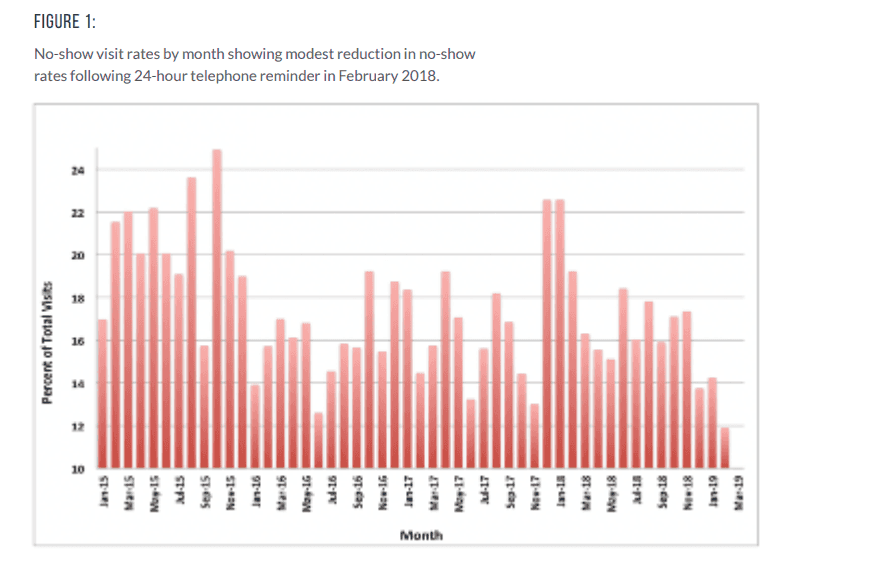
A s_tudy showing a_ reduction in no-show rates with a 24-hour telephonic appointment reminder
The key takeaway here is that every missed appointment costs something to your business, regardless of your industry. If clients/customers or patients regularly forget appointments, struggle to reschedule, or simply don’t show up, your booking process has flaws that need to be addressed.
Rather than focusing on hitting a specific percentage, aim to build a system that makes attending appointments the easiest option. Automated reminders, self-service rescheduling, calendar invitations, and booking deposits consistently reduce missed appointments across industries, which is exactly what we’ll cover next.
Why do people no-show for appointments? (Common cause)
Whether you’re managing patient appointments, client consultations, or service bookings, most no-shows happen for a handful of predictable reasons. Understanding these patterns is the first step toward reducing no-shows.
1. They simply forget
This is by far the most common cause for no-show appointments. People are busy, and appointments booked days or weeks in advance are easy to overlook. What makes it easier to miss is when the booking flow doesn’t include reminder emails or text messages.
How Cal.com helps: Automated email and SMS reminders keep every appointment top of mind without requiring manual follow-ups.
2. It’s too difficult to reschedule
As mentioned previously, the rescheduling policy must be easy to understand and follow for attendees in order for it to be effective. Otherwise, when life happens, and your policy requires attendees to make phone calls, emails, or wait for business hours to change their appointment, they’re more likely to just bail on it altogether.
How Cal.com helps: Every booking includes one-click reschedule and cancellation links, making it easy to move an appointment instead of missing it.
3. There’s no financial commitment
When there’s no penalty for missing an appointment, attendees often have no incentive to attend. This is where booking policies require users to put in deposits or cancellation fees.
How Cal.com helps: It allows you to collect deposits or full payments during booking with Stripe integrations to encourage attendance and reduce last-minute no-shows.
4. The appointment was booked too far in advance
The longer the gap between booking and the appointment date, the greater the chance that plans will change or the appointment will be forgotten. So, it is not in the best interest of some businesses to allow attendees to book months in advance.
How Cal.com helps: Availability controls, booking limits, and automated reminders help reduce the impact of long lead times.
5. Personal or logistical barriers get in the way
These are factors that you, as a business owner, have no control over. Transportation issues, work commitments, childcare, illness, anxiety, or other personal causes can all prevent someone from attending. In healthcare specifically, these challenges are a major reason for patient no-shows, especially in the mental health setting.
How Cal.com helps: Offer virtual appointments where appropriate and let attendees reschedule themselves if plans change.
6. Expectations weren’t communicated clearly
If attendees don’t know your cancellation policy, arrival instructions, or what to expect during the appointment, they’re more likely to be late, cancel late, or not show up at all.
How Cal.com helps: The platform allows you to include booking instructions, confirmation emails, and your no-show policy directly within the scheduling workflow so everyone knows what’s expected.
The common causes for appointment no-shows mentioned above are all preventable problems. By removing friction from the booking experience and automating communication, businesses can significantly reduce no-shows without creating more administrative work.
How to reduce no-show appointments (8 proven strategies, with Cal.com)
If no-shows are preventable, then why are they so common? This is a question small businesses often wonder. The answer is that no-shows happen often because the booking experience makes it easy to forget, difficult to reschedule, or too easy to walk away without consequences. If you, as a business owner, can address these friction points, you can significantly reduce the risk of missed appointments while improving the booking experience for your customers/clients.
To help you get started, here are the eight proven strategies that work across healthcare practices, professional services, coaching, fitness businesses, and any other appointment-based business. With Cal.com, you can achieve all the best practices combined into a single scheduling platform, so that you don’t need multiple tools or manual follow-ups to keep your calendar full.
1. Send automated reminders (Email + SMS)
The biggest reason people miss appointments isn’t that they don’t intend to show up. It’s because they simply forget. To prevent this, you need to integrate automated reminders in your scheduling workflow. This is especially required if your appointment wait time is longer than a week. In such cases, it is harder for attendees to keep track of their appointments. Timely reminders in such cases can help attendees have the opportunity to reschedule their appointments if their plans have changed.
A single confirmation email is not enough. You need to send reminders at key intervals to prevent the risk of no-shows. When should you send the reminders? The rule of thumb is to send the reminder 24 hours before the appointment time and date. This helps attendees opt for rescheduling or cancellation if they are unavailable to make it to the appointment. Sending another reminder just one hour before the appointment time is another good practice to help attendees get the immediate notification they need to ensure they attend their appointment.
With Cal.com, you can automate this entire meeting process using reminder workflows. Every booking can automatically trigger email and SMS reminders. This ensures every attendee receives timely notifications without your team having to send them manually.
Why it works?
-
Reduces the risk of forgotten appointments, which is the leading cause of no-shows
-
Gives attendees time to reschedule or cancel their appointment instead of missing it
-
Eliminates the need for manual reminder calls and emails
-
Creates a consistent experience for every booking
One of the best parts of using Cal.com is that once you set up the reminder workflow, it runs automatically for every appointment. This helps you reduce no-show appointments without adding extra admin work.
2. Make rescheduling effortless
Sometimes, people don’t miss appointments because they’ve lost interest; they miss them because something unexpected comes up. A work meeting runs late, a child gets sick, or travel plans change. If rescheduling requires a phone call, an email exchange, or waiting for office hours, many people simply won’t bother. The result is a no-show instead of a rescheduled appointment.
The easier you make it for someone to change their booking, the more likely they are to keep doing business with you. A simple self-service rescheduling option not only reduces missed appointments but also improves the overall customer experience by giving people more flexibility.
With Cal.com, every booking confirmation includes secure one-click reschedule and cancellation links. Attendees can choose a new time that fits their availability without contacting your team. This also frees up the original time slot automatically for someone else to book. The automated process ensures your attendees also don’t have to feel guilty about wanting to reschedule, as long as they do it within the predefined guidelines.
Why it works?
-
Encourages people to reschedule instead of becoming a no-show
-
Reduces administrative work by eliminating manual booking changes
-
Instantly updates your calendar and availability
-
Improves the booking experience without sacrificing control over your schedule
For businesses with high appointment volumes, even a small increase in successful reschedules can translate to dozens of recovered appointments each month. Rather than losing revenue from missed bookings, you can keep your calendar moving and give clients or patients an easy way to stay committed to their appointments.
3. Require a deposit or payment at booking
One of the most effective ways to reduce no-show appointments is to create a sense of commitment before the appointment ever begins. When people have invested financially, even if its a small deposit, they’re far more likely to attend or reschedule instead of abandoning the booking altogether.
This doesn’t mean every business should charge the full appointment fee upfront. For many service-based businesses, a refundable deposit or partial payment is enough to encourage accountability while remaining customer-friendly. It is important to note that in some cases it is worth it to request the full appointment amount in advance as it helps reduce the time of service for attendees at the time of their visit. So, make sure you account for the nuances and make the decisions accordingly.
With Cal.com, you can collect both deposits and the full payment for your appointment during the booking process through its native Stripe integration. If Stripe is not your choice of payment gateway, you can also use PayPal with Cal.com, too. The payment becomes part of the scheduling workflow, and the booking isn’t confirmed until the payment status is confirmed. It eliminates the need for separate invoicing or payment requests.
Why it works?
-
Creates a financial commitment that discourages no-shows
-
Reduces last-minute cancellations and abandoned bookings
-
Protects revenue for high-value appointments
-
Combines scheduling and payment into one streamlined booking experience
If you decide to charge a deposit, be transparent about your cancellation and refund policy. Display it during the booking process so customers know exactly when they’re eligible for a refund or when a no-show fee applies. Clear expectations not only reduce disputes but also encourage attendees to reschedule if they can’t make it to the appointment.
4. Confirm every booking and add it to the attendee’s calendar
Once the booking is complete, make sure your booking workflow includes sending a confirmation email and SMS to the attendee. This confirmation email should add the event to the attendee’s calendar. This makes it harder for the attendee to forget about the appointment, even if it has been booked well in advance. The calendar apps also send reminders themselves for appointments, especially on mobile devices.
With Cal.com, every successful booking automatically generates a confirmation and calendar invitation that attendees can add to their preferred calendar application. If you’re hosting virtual appointments, the confirmation email can also contain the meeting link, ensuring that someone's needs are available in one place.
Why it works?
-
Reduces forgotten appointments by placing them directly on attendees’ calendars
-
Prevents scheduling conflicts and double-bookings
-
Gives attendees instant access to appointment details and meeting links
-
Creates a professional booking experience from the very beginning
While a confirmation email alone is helpful, it’s even more effective when combined with automated reminders and easy self-service rescheduling. Together, these touchpoints keep attendees informed from the moment they book until the appointment begins, making it much less likely they’ll become a no-show.
5. Shorten lead times and reduce booking friction
This is a different approach from the others we have talked about so far. Adding a paywall and the other points mentioned above intentionally add a little friction to your booking process. However, this is where we smooth out the rough edges of a workflow and ensure that the friction you’ve integrated isn’t negatively impacting your booking figures.
What that means is, the longer someone has to wait for an appointment, the more likely they are to forget about it or have their plans change. Whether you’re running a medical practice, consulting business, salon, or coaching service, long lead times naturally increase the risk of no-shows. The same is true when your booking process is very complicated. Every extra step creates another opportunity for people to abandon their bookings and appointments.
Whenever possible, make it easy for customers/clients to book appointments sooner rather than later. Offer real-time availability, minimize unnecessary booking fields, and let people schedule appointments online without having to call or exchange emails. Cal.com helps in this regard by reducing friction with customizable booking pages, real-time availability, and scheduling controls such as minimum notice periods and booking limits.
Why it works?
-
Reduces the likelihood of plans changing before the appointment
-
Makes booking quick and convenient for attendees
-
Eliminates back-and-forth scheduling emails
-
Helps fill your calendar with appointments that are more likely to be kept
A shorter gap between booking and the appointment, combined with automated reminders, gives attendees fewer opportunities to forget or lose interest. Instead of chasing people to confirm their attendance, you’re creating a booking experience that naturally encourages them to show up.
6. Offer virtual appointments where it makes sense
Not every appointment needs to happen in person. For many businesses, offering a virtual option removes some of the biggest barriers to attendance. If someone can join from home or the office, they’re far more likely to keep their appointment.
Virtual appointments are easily valuable for consultants, coaches, therapists, tutors, and other knowledge-based professionals, but they’re equally useful for follow-up healthcare visits, client check-ins, and initial discovery calls. Even if your business primarily operates face-to-face, giving customers the flexibility to switch to a virtual meeting when appropriate can significantly reduce last-minute no-shows.
With Cal.com, you can schedule virtual appointments using Cal Video or connect your preferred video conferencing platform. Meeting links are automatically generated and included in booking confirmations, calendar invites, and reminder emails, so attendees have everything they need before the appointment begins.
Why it works?
-
Removes travel and accessibility barriers
-
Makes it easier for attendees to keep appointments despite changes in their schedule
-
Simplifies the booking experience with automatically generated meeting links
-
Give customers and patients greater flexibility without creating extra work for your team
Virtual appointments won’t replace every in-person meeting, but offering them as a fail-safe can recover bookings that might otherwise become no-shows. When combined with reminders, calendar invites, and easy rescheduling, they create a more convenient experience for attendees that encourages people to attend rather than cancel their appointment.
7. Set and enforce a clear no-show policy
Even the best reminder system can’t prevent every missed appointment. This is why you need to have a very clearly worded no-show appointment policy. It is a necessity for all service-based businesses. This policy explains what happens if someone doesn’t attend or cancels their appointment too late. When expectations are communicated upfront, customers and patients are far more likely to take their booking seriously.
A good no-show policy doesn’t have to be complicated. It should qualify what counts as a no-show and how much notice is required to cancel or reschedule an appointment. It should also clarify whether a fee or deposit applies, and how exceptions are handled. These are the most important pieces of information that your policy must define and present in front of attendees before a booking is completed. It will help prevent misunderstandings and encourage accountability.
With Cal.com, you can surface your cancellation terms and no-show policy during the booking process. If you collect deposits or payments, attendees see the applicable rules before confirming their appointment, creating transparency from the start.
Why it works?
-
Sets clear expectations before the appointment is booked
-
Encourages attendees to cancel or reschedule instead of becoming a no-show
-
Reduces disputes over cancellation fees or forfeited deposits
-
Creates a more professional and consistent booking experience
Your policy should protect your time without discouraging legitimate bookings. Keep the language very simple, apply it consistently, and make it easy for people to reschedule within the allowed notice period.
8. Fill empty slots as quickly as possible
Even with the best systems in place, some cancellations and no-shows are inevitable. The goal isn’t just to prevent missed appointments; it’s also to minimize their impact. If you can fill an empty slot quickly, you recover lost revenue, keep your team productive, and make better use of your schedule.
Instead of letting cancellations create gaps in your calendar, build a process for making newly available times bookable immediately. This is particularly valuable for businesses with high demand, where another customer or patient is often willing to take an earlier appointment if one becomes available.
Cal.com makes this easy with features like round-robin scheduling, shared team availability, and real-time calendar updates. When an appointment is cancelled or rescheduled, the time slot automatically becomes available for someone else to book without anyone on your team having to manually update the calendar.
Why it works?
-
Helps recover lost revenue from cancellations or no-shows
-
Keeps your calendar as full as possible
-
Reduces idle time for individuals and teams
-
Gives customers and patients more opportunities to book earlier appointments
While you can’t eliminate every missed appointment, you can stop them from disrupting your schedule. Combined with automated reminders, self-service rescheduling, booking deposits, and clear policies, filing cancelled slots quickly creates a scheduling system that’s resilient, even when plans change.
Ready to automate every one of these strategies?
Create your free Cal.com booking page today and start reducing no-shows.
No-show policy template (what to include)
A clear no-show appointment policy protects your time while setting expectations before an appointment is booked. Whether you run a clinic, salon, consultancy, coaching, business, or another appointment-based service, your policy should be easy to understand, fair to customers, and applied consistently.
No-show and cancellation policy template
1. What counts as a no-show?
A no-show occurs when a client or patient does not attend their scheduled appointment and fails to cancel or reschedule before the required notice period.
2. Cancellation and rescheduling notice
We kindly ask that you cancel or reschedule your appointment at least [24/48] hours before your scheduled time.
3. Late cancellations
Appointments cancelled with less than [24/48] hours' notice may be subject to a cancellation fee of [amount or percentage].
4. No-show fee
Clients or patients who do not attend their appointment without prior notice may be charged [fee/deposit/full appointment cost], or any prepaid deposit may be forfeited.
5. Exceptions
We understand that emergencies happen. Fees may be waived at our discretion in cases such as medical emergencies, severe weather, or other unforeseen circumstances.
6. How to cancel or reschedule
Appointments can be cancelled or rescheduled using the link in your confirmation email or by contacting us at [phone number/email].
7. Repeat no-shows
Repeated missed appointments may require full prepayment for future bookings or may result in restrictions on future scheduling.
The template provided above is for you to get started. You must edit it to include your specific business information and alter any information you require to ensure the policy aligns with your business requirements.
Conclusion
Learning how to reduce no-show appointments isn’t about relying on a single strategy. It involves creating an optimized booking experience for your customers/patients/clients that makes attending the appointment the easiest option. The strategies mentioned in this blog are all tried and tested to help businesses reduce the risk of no-show appointments.
With Cal.com, you can enforce all of the strategies in an automated manner with minimal setup requirements. Cal.com offers automated email and SMS reminders, online payments, one-click rescheduling, reliable calendar integrations, and customizable booking pages and workflows. All these features are built to help businesses spend less time chasing missed appointments and more time serving their customers and clients.
So, if you’re ready to cut your no-show rates, choose Cal.com today and start automating your reminders, payments, rescheduling, and confirmations in just a few clicks.
Frequently asked questions
1. What is a no-show appointment?
A no-show appointment occurs when a client or patient schedules an appointment but doesn’t attend or doesn’t cancel beforehand. Unlike a late cancellation or a rescheduling request, there’s no communication from the attendee in case of a no-show, and they also fail to appear for their appointment. This causes lost revenue for businesses and wasted staff time.
2. What is a good no-show rate?
There’s no universal good no-show rate for businesses. The industry, booking volume, and business specialty often determine the no-show rates that are prevalent. On average, a no-show rate of below 10% is ideal for businesses, while acceptable for realistic levels often range between 10% to 15%.
3. Why do people no-show for appointments?
People no-show for appointments because they simply forget about their appointments. The other reasons include personal plan changes, health factors, changes to travel plans, unavailability of childcare, and a ton of other factors. The key here is to understand that attendees do not no-show without reason, so it is important to have proper rescheduling features in your workflow to ensure attendees can reschedule or cancel their appointment in time, if plans change.
4. How do I reduce no-show appointments?
The most effective approach is to combine multiple proven strategies rather than relying on just one. Send automated email and SMS reminders, make rescheduling simple, collect deposits when appropriate, confirm bookings with calendar invites, offer virtual appointments when possible, and communicate a clear no-show policy. You can automate all these measures when you choose a capable scheduling platform, like Cal.com.
5. What should a no-show policy include?
A good no-show appointment policy should clearly explain:
-
What qualifies as a no-show
-
How much notice is required to cancel or reschedule?
-
What are the cancellation or no-show fees, if any?
-
How can clients or patients reschedule?
-
Can exceptions be made for emergencies?
-
How is the policy enforced for repeated no-shows?
6. Can reminders and deposits really reduce no-shows?
Yes, automated reminders reduce forgotten appointments, while deposits or upfront payments create a financial commitment that encourages people to attend or reschedule instead of missing the appointment altogether. When combined with confirmation emails, calendar invites, and self-service rescheduling, these strategies can significantly lower no-show rates, especially if you’re using capable scheduling platforms like Cal.com.